🌈 ESP32-S3 Rainbow: ZX Spectrum Emulator Board! Get it on Crowd Supply →
View All Posts
read
Want to keep up to date with the latest posts and videos? Subscribe to the newsletter
HELP SUPPORT MY WORK: If you're feeling flush then please stop by Patreon Or you can make a one off donation via ko-fi

You can watch a full video version with more details here.

I know, I know, the title is a bit click-baity. But you try coming up with a constant stream of entertaining titles!

What are we talking about? This line of code that appears in pretty much every single Arduino sketch/project:

Serial.begin(115200);

This line of code is everywhere - a quick search on GitHub finds over 450,000 instances of it.
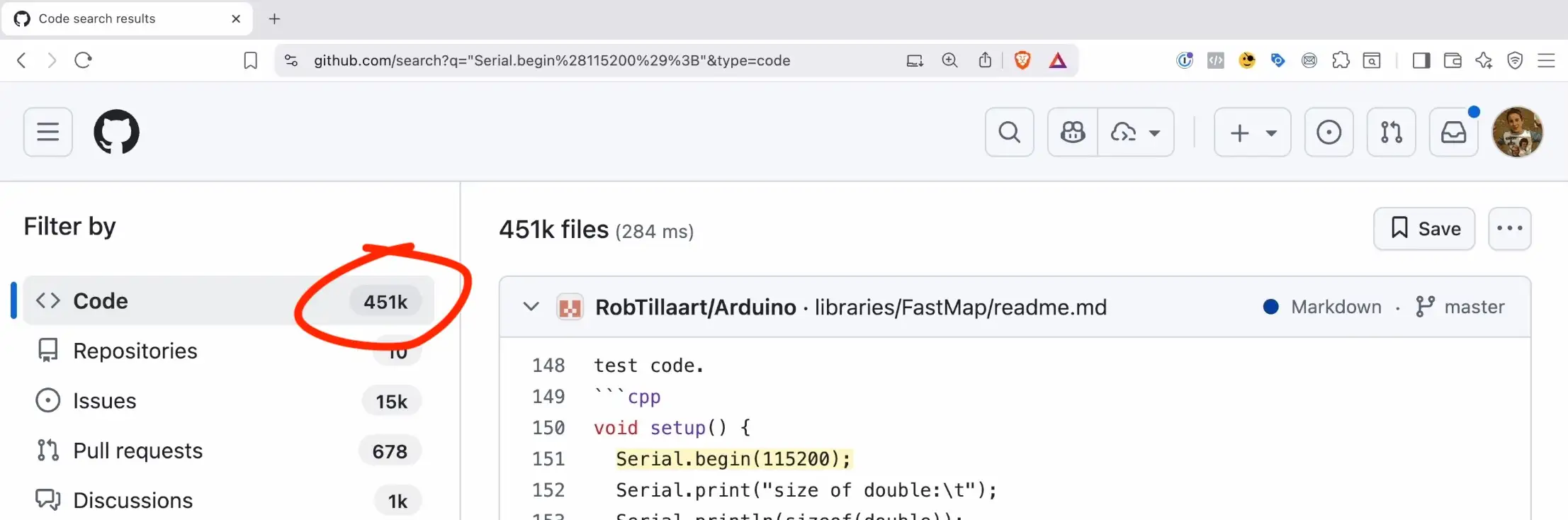
GitHub Search

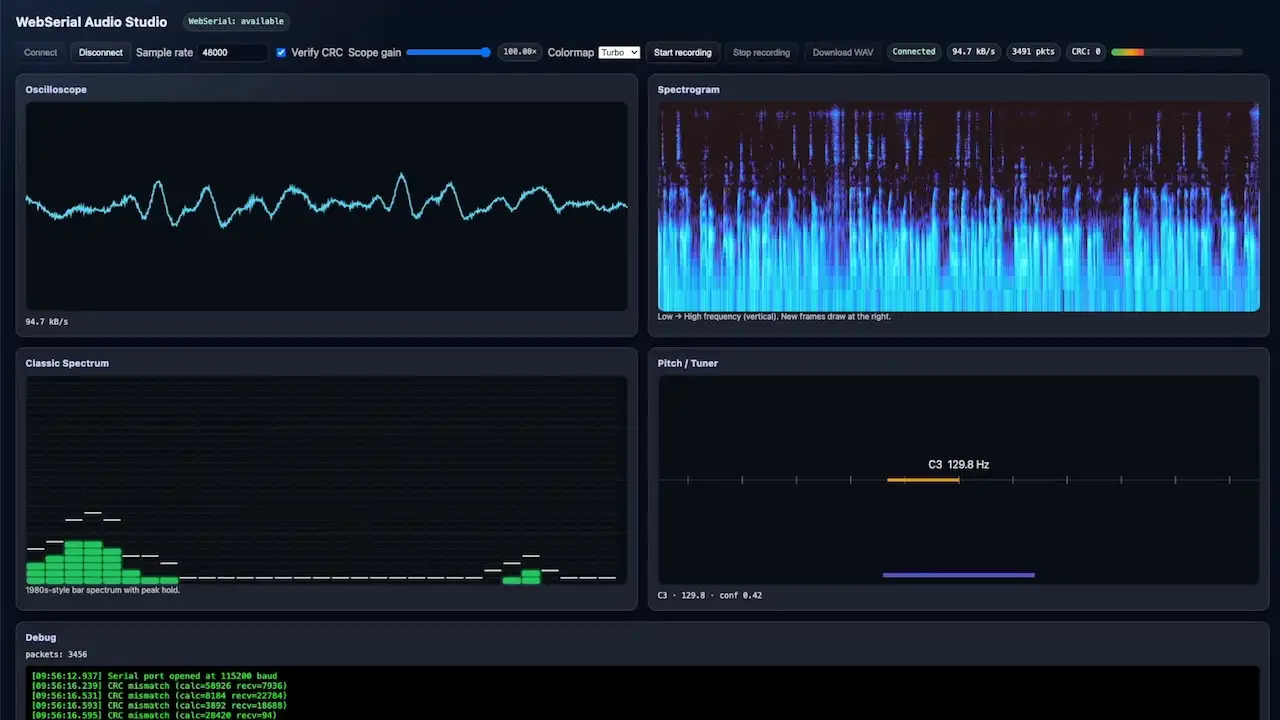
I started to question this when I was testing out my new boards. I was streaming audio from the board and noticed that the rate I was receiving data at bore no relation to the baud rate I was setting.
Audio testing

If we look closely at the image, we can see that we connected to the serial port at 115200 baud. This matches exactly what I put in the Serial.begin of the firmware.

115200 Baud Rate

This baud rate (115200) should give us 14.4kByte/s. But if we look at the rate at which we are receiving data, we can see that it is much higher. 94.7kByte/s.

94.7kByte/s

What on earth is going on?

Well, my board is based around an ESP32-S3. This has native USB support - and the serial connection is running over the USB connection.

We don’t have a USB-to-serial converter on the board.

There is no UART.

Which means there’s no actual baud rate (this is not strictly true, it is possible to find out what the baud rate was set to - but that’s for another day).

I did a quick test to confirm this - I ran the firmware with 115200 and then connected with a python script that tried a variety of baud rates.

As you can see from the results - everything just worked.
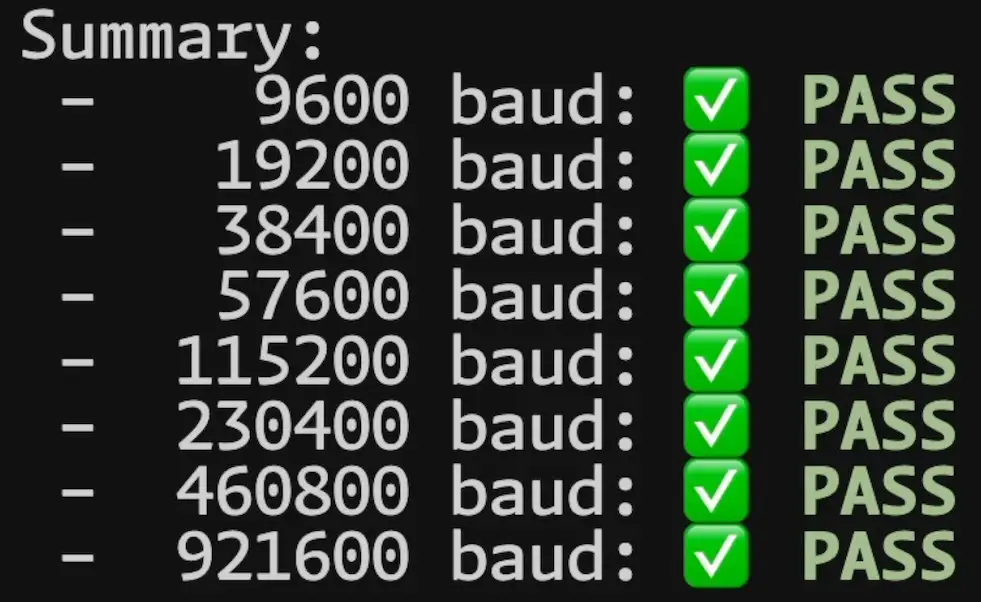
The results

A good question to ask now is, just how fast can we send data? What’s the limit?

Well, USB Full Speed is 12Mbit/s. With overheads and other factors, realistically we should be able to get around 9.6Mbit/s.

So I wrote another quick bit of code to test this. The firmware sends out a 4MB payload and a python script received it. Just to make sure there’s no cheating I run a CRC check on the data.

With an arduino version of the firmware, I was able to get over 7MB/s.

Arduino Speed

With the ESP32-S3 version of the firmware, I was able to get over 5MB/s.

IDF Speed

The IDF is surpsingly slower than the Arduino version. There’s is an issue open at the moment on the ESP32 TinyUSB implementation that may fix this at some point.

TinyUSB issue

Obvisouly, my tests are very much raw performance tests. Real world behaviour is likely to be very different.

But it’s interesting none the less. Obviously, with boards that have a UART, you will be limited by the ESP32 UART hardware. I believe this maxes out at 5Mbit/s but I’m planning to test this soon.

UPDATE - I gave it a quick test on an old ESP32 board with a USB-to-serial converter and got 2.26 Mbit/s. This is with a baud rate set to 3,100,000 - which is the highest I set it to and get consistent results.

All my test code is available on GitHub.

Have a watch of the video - it’s got some fun bits and more details.

Related Posts

ESP32-S3 USBMSC - Can we make it faster? - After lots of tinkering, I've managed to improve the speed of writing to the SD Card of my ESP32-TV considerably, but it's still not as fast as I'd like. The Arduino 'readRaw' and 'writeRaw' functions were the culprits, they can only write one sector at a time! After bypassing this and using IDF functions, writing speed improved by 70%. I also experimented with writing to the SD Card in the background, which ironically yielded even better results. However, it's still slower than I'd like, so I've got a crazy new plan: using a cheap IC (GL823) for SD card interfacing and a USB multiplexer switch to swap connections between ESP32 and GL823. It's a wild ride, but that's how we make progress!
ESP32-S3 USB UAC - I turned my new ESP32‑S3 board into a USB Audio device. After a ninja LED fix and confirming the IMU and charging, I streamed mic audio over Web Serial (with a slick AI-made ā€˜Audio Studio’) and then via USB UAC. The mic sounds great, but the speaker is crackly over UAC—even though I2S WAV playback is perfectly clean. ESP-IDF worked; Arduino didn’t. Bonus annoyance: macOS vs Windows is a toggle, not a combo. Still, this board passes QA.
ESP32-S3 Hardware SPI on the Adafruit ST7789 - I've had some commenters point out the issue with the slow display updates in my recent Arduino Nano ESP32 video. It turns out, the software SPI of the Adafruit_ST7789 library was the culprit. Lo and behold, the solution is simple - using the hardware SPI constructor of the library. Apparently, this isn't well documented, so I wrote some code to serve as reference for myself and others who might run into the same snags. Trust me, the difference in speed is absolutely bonkers. Check out the video to see the magic in action.
ESP-IDF v6 in VS Code: Blink (and debug) on the ESP32-S3 - I finally crawled out of the v5.x cave, installed ESP-IDF v6.0.1 with the VS Code extension, spun up the Blink example on an ESP32-S3, fixed a finicky flash by switching to UART, then used menuconfig to set the LED pin, bump the CPU to 240 MHz, use the full 16 MB flash, and enable 8 MB PSRAM. Wrapped it up with proper USB JTAG debugging in VS Code. If you’ve been putting off the IDF, v6 in VS Code is a super-smooth on-ramp.
A Potentially Explosive Error - Just received the new PCBs for the ESP32-TV project and they're looking sharp with only a tiny resistor tweak needed. But I discovered a sneaky, undocumented resistor causing a conflict between the ESP32 and USB2244 over the USB connection. Fixed that, but there's a bigger issue lurking in the design - check the schematic in the video and see if you can spot it before I reveal the explosive mistake!

Related Videos

This Number Does Nothing… when you have native USB - This video's all about how the baud rate setting on an ESP32S3 with native USB does absolutely nothing. Testing with different baud rates showed no effect on performance; every rate worked flawlessly. With USB full speed, you can expect data transfers of up to 7 megabits per second. So, baud rate? Totally irrelevant with native USB—it's full steam ahead, folks! Grab my test code from GitHub, give it a go, and share your results in the comments. If that blew your mind, don't forget to like and subscribe for more ESP32 insights!
ESP32 SD Card Speedup With a Couple of Lines of Code - In this video, we explore the disappointingly slow data writing speed of the ESP32 when reading and writing to an SD card in our TinyTV project. With 500 kilobytes/sec reading and a dismal 270 kilobytes/sec writing, we embark on an adventure to find a solution. After ditching the Arduino code in favor of IDF functions, we discover incredible improvements. Seeing potential risks, I propose a truly bonkers plan: using a IC to interface SD cards with USB with a USB multiplexer switch and another switch to alternate between ESP32 and the GL823. This could be a total disaster, but I'm game for the challenge. Stay tuned to see if it works out!
Stop Using printf() - Debug ESP32 the Right Way - Right, let’s give this a go. Instead of drowning in printf()s and blinking LEDs, I show how the ESP32-S3’s built‑in USB JTAG lets you hit Debug in the Arduino IDE (or PlatformIO) and actually step through code. We set breakpoints, add watch expressions, use conditional breakpoints, and even edit variables live with a simple FizzBuzz/LED demo. It’s quick, it works, and it beats ā€œworks on my machineā€ā€”just mind real‑time code and ISRs. Works on ESP32s with native USB.
I Feel the Need – The Need for Hardware SPI… - An insightful iteration on my Arduino Nano esp32 video. Despite criticism regarding the slow display update speed, a solution was found thanks to the helpful fellow, Nick. Turns out, the software SPI was the cause of the issue. A quick tweak in the code and voilĆ , we've got ourselves an SPI clock whizzing at 80 megahertz. Quite the speed boost for just a few lines of code alteration!
ESP32-S3 - Which Pins Are Safe To Use? - In this video, I've decided to dive deep into the ESP32-S3, a module ruling my lab recently due to its plug-in-and-play functionality, and the flexibility offered by its GPIO matrix. However, working with it requires vigilance, especially with regard to the strapping pins and USB data pins, among others. Discovering such quirks, I've encountered unexpected values, short glitches and the occasional code crash. To help you avoid these bumps, I've documented everything I've learned on my GitHub repo, where I'm inviting you, my fellow makers and engineers, to contribute your valuable experiences and findings. After a minor hiccup with my ESP32-TV, expect an updated PCB design, courtesy of PCBWay. Explore the ESP32-S3 with me, and let's unravel its secrets together, one pull request at a time.
HELP SUPPORT MY WORK: If you're feeling flush then please stop by Patreon Or you can make a one off donation via ko-fi
Want to keep up to date with the latest posts and videos? Subscribe to the newsletter
Blog Logo

Chris Greening


Published

> Image

atomic14

A collection of slightly mad projects, instructive/educational videos, and generally interesting stuff. Building projects around the Arduino and ESP32 platforms - we'll be exploring AI, Computer Vision, Audio, 3D Printing - it may get a bit eclectic...

View All Posts