🌈 ESP32-S3 Rainbow: ZX Spectrum Emulator Board! Get it on Crowd Supply →
View All Posts
read
Want to keep up to date with the latest posts and videos? Subscribe to the newsletter
HELP SUPPORT MY WORK: If you're feeling flush then please stop by Patreon Or you can make a one off donation via ko-fi
#ARDUINO #EMBEDDED SYSTEMS #ESP32 #HARDWARE DEBUGGING #I2C #MAKER #MICROSCOPE INSPECTION #MLX90640 #PULL-UP RESISTORS #REWORK #SOLDERING #THERMAL CAMERA

I was doing some experiments with a small infrared thermal sensor module — an MLX90640, 32×24 pixel IR camera that talks over I²C.

This was meant to be a quick test before moving on to a larger project.

It did not go to plan.

The Symptom: Nothing on I²C

When I first plugged the module in, it simply didn’t respond at all.

  • No data
  • No errors
  • No sign of life

An I2C scan showed nothing connected. You can easily run an I2C scan in the Arduino IDE - it’s one of the demos for the Wire library.
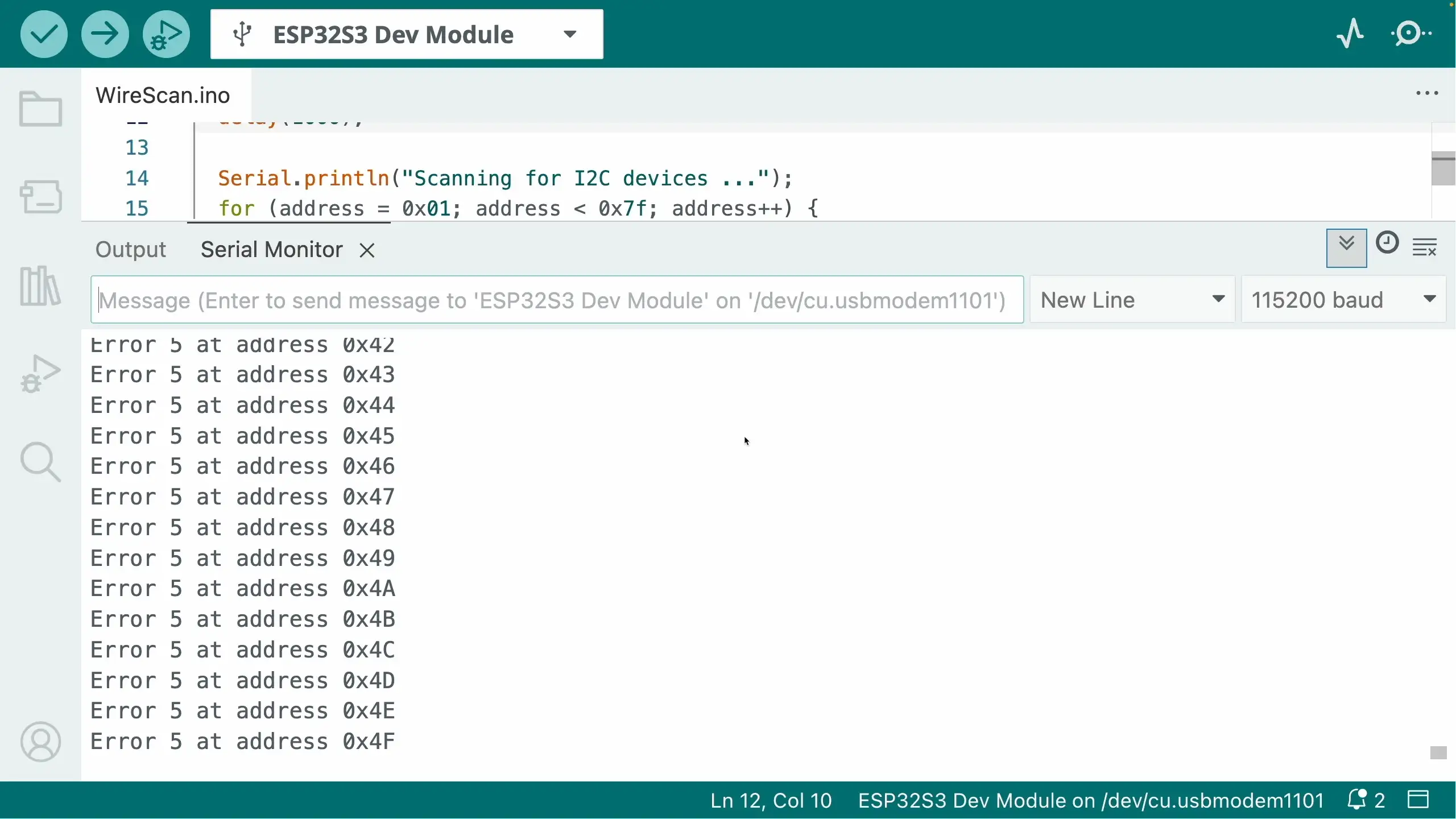
I2C Scanner Shows Nothing

The Usual I2C Suspects

I went through all the standard checks:

✅ I2C Address Scanning

I ran the I2C scanner to see if the device appeared at any address.

Normally, when nothing shows up, there are three things to check:

  • Pull up resistors - do you need them?
  • Wiring - have you got SDA and SCL swapped over?
  • Power issue - are you actually powering the device? Does it take 3V3 or 5V?

✅ Pull-Up Resistors

I²C needs pull-ups on SDA and SCL, so I checked:

  • Are pull-ups present on the board?
  • Does enabled the built in ESP32 GPIO pull ups make any difference?
  • Does adding external ones help?

Some modules include pull-ups, some don’t. Sometimes you can get away with the internal GPIO pull-ups. Sometimes you need stronger ones.

I tried everything!

✅ 5V vs 3.3V Logic

Originally, Arduinos used 5V logic. A lot of “Arduino Compatible” modules include a 3V3 regulator so they can be powered from 5V.

This can cause some issues if you try and power the modules off 3V3 - the LDO that are used can have a surprisingly high drop out voltage (the classic AMS117 can drop 1.2V!). This can cause the boards not to function, or to behave quite eratically.

I tried both 3V3 and 5V - no joy!

✅ Wiring

The other classic is just incorrect wiring. It’s very easy to get SCL and SDA swapped over, or misread the pins you’ve connected to.

It’s also possible that you may get unlucky and pick some pins that are being used for something else - particularly on dev boards that have a lot of built in peripherals.

I tried everything, different pins, different cables, the works.

My first schoolboy/girl error…

Eventually I noticed something embarrassingly obvious.

This module has a small solder jumper that selects I2C mode.

I’d forgotten to add a blob of solder to it - my module was in UART mode! Problem solved I thought to myself!

…still nothing.
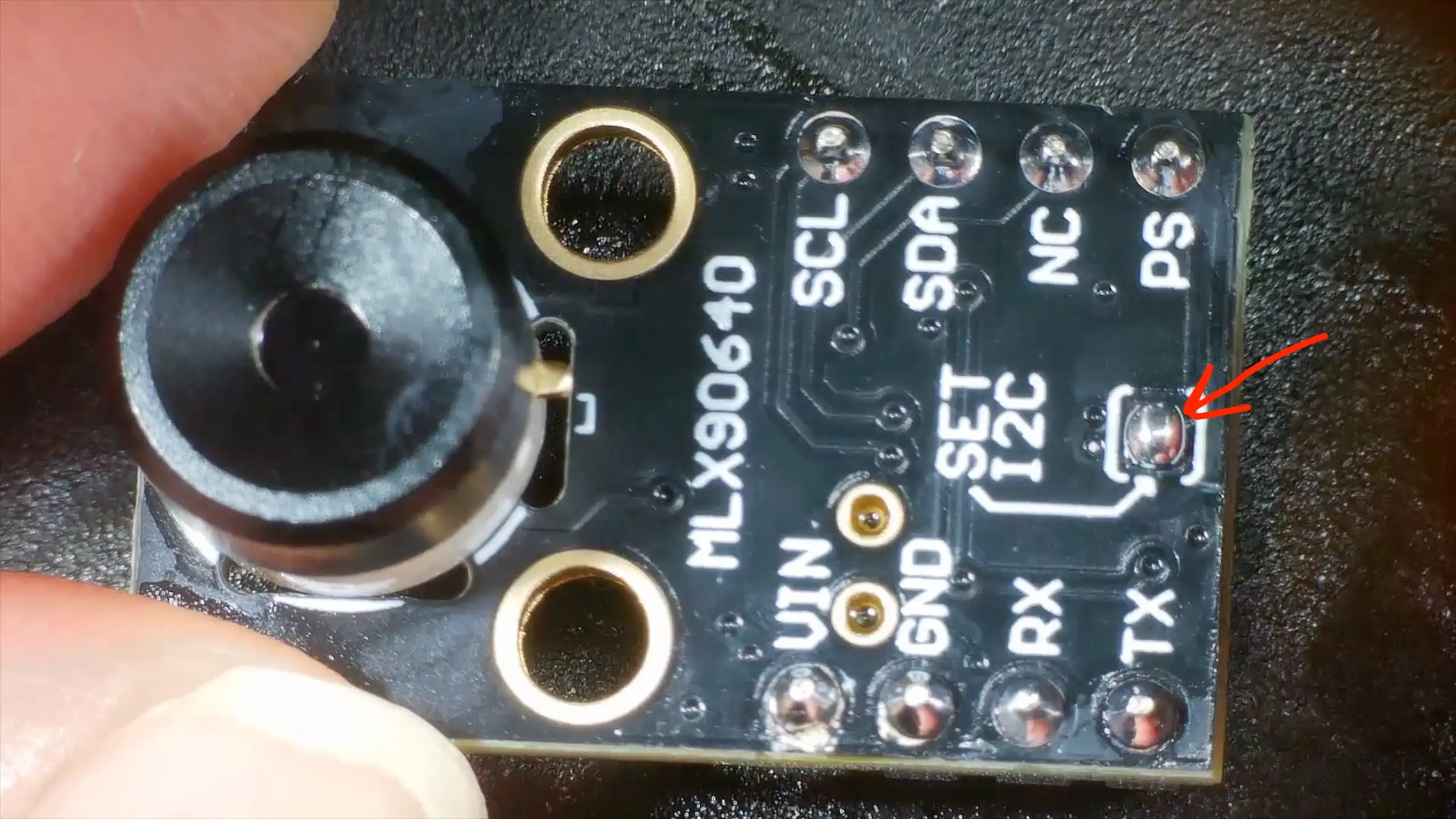
I2C Solder Jumper

The Actual Problem: Bad Soldering

At that point, I stopped assuming the board was electrically sound and put it under the microscope. To be honest, I’d come to the conclusion that my board was DOA and I’d have to ask for a refund.

But, the microscope does reveal all.

Some of the pins on the module’s 3V3 LDO did not look properly soldered.

They looked fine at a distance, but under magnification looked pretty dodgy.
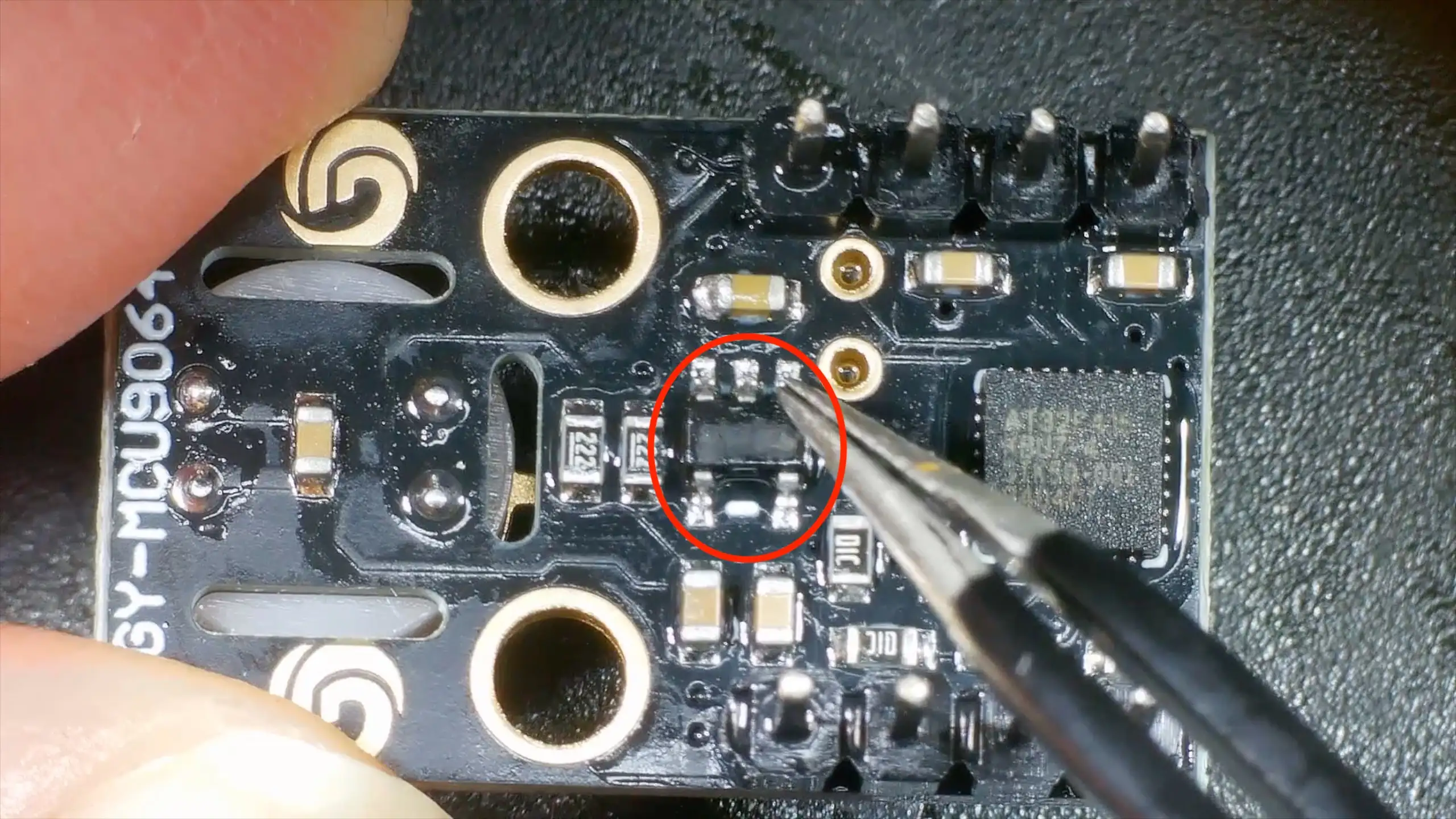
3V3 Regulator

The Fix

I reflowed the joints and everything sprang into life. I2C address scanning found the module and a test program started reading temperatures from it!

Lessons Learned (Again)

This is one of those lessons you know, but still relearn regularly:

🔧 Don’t Trust Factory Soldering

Especially on:

  • Cheap breakout boards
  • Modules from unknown vendors
  • Very fine-pitch ICs

🔍 Look Early, Not Late

If something:

  • Doesn’t respond at all
  • Isn’t visible on I²C
  • Shows zero electrical activity

…get the microscope out sooner rather than later.

🧠 Software Isn’t Always the Problem

If you’ve:

  • Checked wiring
  • Checked voltages
  • Checked pull-ups
  • Checked addresses

It’s probably time to assume hardware.

Coming Up Next

Now that the module is actually working, I can get on with the real project that uses it.

#ARDUINO #EMBEDDED SYSTEMS #ESP32 #HARDWARE DEBUGGING #I2C #MAKER #MICROSCOPE INSPECTION #MLX90640 #PULL-UP RESISTORS #REWORK #SOLDERING #THERMAL CAMERA

Related Posts

Turning an ESP32 into a Thermal USB Webcam - Last time I faked a webcam on an ESP32; this time I built a real one. The ESP32-S3’s native USB + UVC with MJPEG makes a normal camera dead simple—grab JPEG frames and stream. The fun bit is turning an MLX90640 (32×24 thermal) into a proper USB camera: read over I2C, color-map, scale up to 320×240 (nearest or bilinear), JPEG encode, and stream—works in any camera app, no drivers. Bonus lesson: if an I2C scan finds nothing, stop blaming software; mine was a bad 3.3 V regulator solder joint.
I broke it and then i fixed it - Started off on a techie adventure with an RP2040 DVI board from Adafruit, aiming to get the pico-zxspectrum going. Things started acting haywire once the USB hub got involved, ending in a complete shutdown, intuitive diagnosis showed the power pin was a ghost town! After pin-pointing (and removing) the dead IC, I performed a delicate soldering operation to bless it with a new 3V3 regulator. Working the kinks out with the resolution led to a thrilling revival and, voila, we were back in business with DVI output and SD Card support!
ESP32 Rainbow QA - A tale of three boards - We’ve shipped a few hundred ESP32 Rainbow boards-most are perfect - but a few failed QA. Here’s how we tracked down and fixed three real-world faults: no sound from lifted headphone jack pads, USB not enumerating due to a mis-seated ESD IC pin, and a flaky touch keyboard from poor ESP32 module joints. A bit of microscope work and reflow brought two boards back to life (one’s now a donor), and it’s a great reminder why we do final assembly and full QA here in Scotland.
I Bodged a microSD Adapter Back to Life - A cheap microSD adapter died with a horrible scratchy noise, so instead of binning it I cracked it open, found a snapped spring contact, and soldered on a resistor lead as a makeshift tip. Against all odds, it worked and the card mounted—proof these things are just spring contacts—but it’s mechanically cursed and absolutely not to be trusted. Fun experiment, not advice.
Red Arcade Thing Repair - I resurrected a dead AliExpress arcade handheld by swapping the blown 3.3V regulator (I now own 99 spares), adding a TP4056 charger with Schottky diode isolation, and nursing a 0V LiPo back to life. A bit of hot-plate rework, tidier wiring, and—flip the switch—boom: it boots! It’s not pretty, but it’s alive again.

Related Videos

I Spent Hours Debugging My Software… - Quick bench update: I tried to get a 32×24 pixel IR module talking over I2C and it just would not play ball—pull-ups, library swaps, address scans, nothing. First silly mistake was not bridging the I2C jumper. Even after fixing that, still dead. Under the microscope I spotted the real issue: poorly soldered pins on the IC. A quick reflow and some IPA cleanup later, it sprang to life. Moral of the story: if yours won’t talk, check the underside soldering. Project video coming soon.
I Turned an ESP32 into a Thermal USB Webcam - Last time I made an ESP32 pretend to be a webcam; this time it’s a real USB UVC cam streaming MJPEG. Then I go further: I bolt on a tiny 32x24 infrared sensor, scale it up to 320x240 with nearest-neighbor or bilinear, JPEG it, and stream it like any normal webcam. Along the way I show why ESP32-CAM won’t work (no native USB), dive into I2C gremlins (run a scanner first, check pull-ups), and fix a flaky 3.3V regulator solder job. Quick hardware tour: onboard 2.2K pull-ups, ME6212 LDO, and an AT32F415 MCU. Audio can wait—today’s all about making thermal video look good over UVC.
Dodgy circuit could have caused a fire! - So, I got this red mini handheld game thing from AliExpress and it died pretty quickly. After a bit of tinkering, I found that it still draws current but isn't turning on because of a dead battery and a burnt voltage regulator. I removed the faulty components and injected 3.3 volts directly into the system, and guess what? The screen lights up and it works, but there's no sound. Despite the hiccup with my microscope, which stopped recording some interesting bits, you get the picture. It's partly revived but not quite there yet. Big shout out to PCB way who help us out with PCBs!
I Built My Own ESP32-S3 Board… And It Actually Works! - I finally assembled my super simple ESP32‑S3 dev board—voltage regulator, reset button, three status LEDs (5V, 3.3V, and a GPIO blinker), and all pins broken out. I showed two build methods: stencil + hot-plate reflow (quick, with a few USB bridges to clean up) and full hand-solder under the microscope, complete with the rigorous ‘solid’ test. Soldered the ESP32‑S3 module (skipping the center thermal pad unless you need it), plugged in, got power LEDs, confirmed USB enumeration, flashed a blink sketch, and we’ve got a blinking LED. Next up: turning this basic dev board into something more professional for production.
Why did I fix this? - Quick little teardown and bodge-fix: my scratchy-sounding SD card adapter had a wonky contact pin. I cracked it open, tried to bend it back, promptly snapped it, then lost the bit. So I chopped a resistor leg, soldered it in under the microscope, tweaked the pins for continuity, and slapped it back together. Plugged it in—holy crap, it worked! Not the prettiest fix, and I probably won’t trust it long-term, but that was fun.
HELP SUPPORT MY WORK: If you're feeling flush then please stop by Patreon Or you can make a one off donation via ko-fi
Want to keep up to date with the latest posts and videos? Subscribe to the newsletter
Blog Logo

Chris Greening


Published

> Image

atomic14

A collection of slightly mad projects, instructive/educational videos, and generally interesting stuff. Building projects around the Arduino and ESP32 platforms - we'll be exploring AI, Computer Vision, Audio, 3D Printing - it may get a bit eclectic...

View All Posts